Caller Name Announcer App – Hear Who Is Calling Without Checking Your Phone
Smartphones are an essential part of everyday communication, but checking the screen every time the phone rings is not always convenient. You might be cooking, exercising, working, cleaning, or simply have your phone placed away from you. In these situations, a Caller Name Announcer App can help by speaking the caller’s name aloud.
A caller name announcer generally uses Text-to-Speech (TTS) technology to turn available caller information into a voice announcement. When someone saved in your contacts calls, a compatible app can announce that person’s name. Some apps may also announce unknown phone numbers, SMS senders, notifications, or other phone alerts.
This guide explains what a Caller Name Announcer App is, how it works, its useful features, setup process, benefits, limitations, and important privacy considerations.
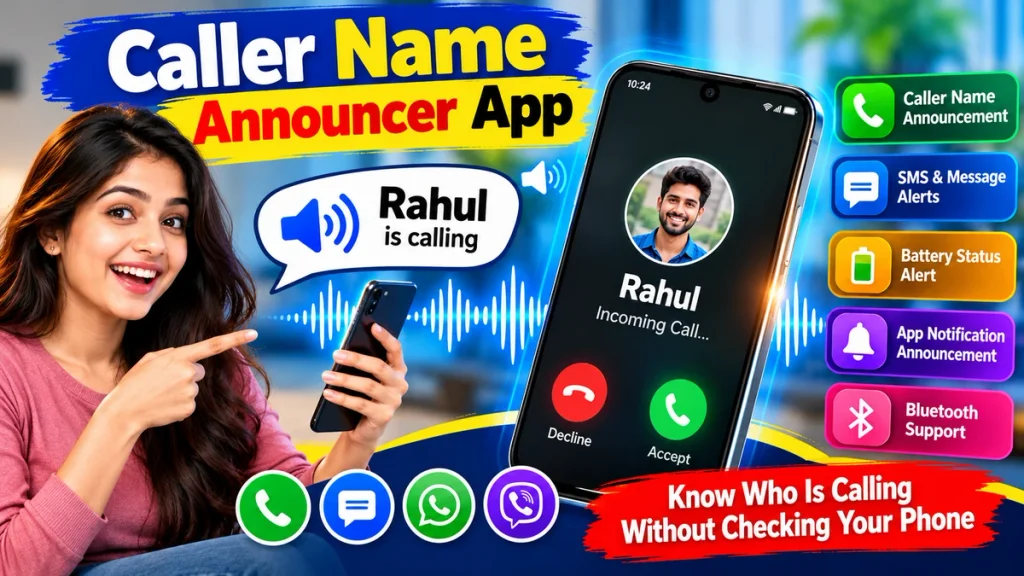
Caller Name Announcer App – Quick Overview
| Feature | Details |
|---|---|
| App Type | Caller Name Announcer / Caller Speaker |
| Main Purpose | Hear who is calling |
| Technology | Text-to-Speech (TTS) |
| Saved Contacts | Can announce contact names |
| Unknown Numbers | Some apps can announce numbers |
| SMS Announcer | Available in selected apps |
| Voice Settings | Language, speed and pitch may be adjustable |
| Bluetooth Support | Depends on app and device |
| Internet | Basic functions may work offline |
| Best For | Hands-free caller identification |
| Availability | Features vary by device and operating system |
What Is a Caller Name Announcer App?
A Caller Name Announcer App is a mobile utility that provides spoken information when you receive an incoming call.
Normally, when your phone rings, you need to look at the display to identify the caller. With a caller announcer enabled, the phone can speak the caller’s saved contact name.
For example, if a person saved as “Rahul” calls, you might hear:
“Incoming call from Rahul.”
If the number isn’t saved in your contacts, some apps may announce the phone number instead. The exact behavior depends on the app, operating system, permissions, and your selected settings.
How Does a Caller Name Announcer Work?
The basic technology behind these apps is relatively simple.
When an incoming call arrives, the app uses caller information that the operating system makes available. If the incoming number matches a saved contact, the corresponding contact name can be sent to the phone’s TTS engine.
The Text-to-Speech engine converts that text into spoken audio.
Therefore, the quality of the announcement can depend on several factors, including the selected TTS voice, language support, how a contact’s name is saved, and the capabilities of the particular app.
Why Use a Caller Name Announcer?
The biggest advantage is that you can identify certain incoming calls without immediately looking at your phone.
Useful When Your Hands Are Busy
Imagine that you’re cooking and your hands are wet. Your phone rings from the other side of the kitchen.
Instead of stopping what you’re doing just to check the caller, the spoken announcement can tell you who is calling.
The same benefit applies while cleaning, gardening, exercising, or performing other hands-on activities.
Convenient During Work
Constantly checking your smartphone can interrupt concentration.
If the caller’s name is announced aloud, you can decide whether the call might require immediate attention without first picking up the device.
Helpful for Audio-Based Accessibility
Spoken caller identification may also be helpful for users who prefer audio information or find it difficult to read caller information on a screen.
Caller-announcement applications can complement accessibility tools already available on smartphones.
Caller Name Announcer While Driving
A caller announcement can help you know who is calling without looking down at the phone solely to identify the caller.
However, a Caller Name Announcer should not be treated as a substitute for safe driving practices.
Do not manually operate your phone while driving where doing so is unsafe or prohibited. Follow applicable traffic rules and use an appropriate hands-free system where permitted.
The main purpose of an announcement is to provide information without requiring unnecessary screen interaction.
Important Features of a Caller Name Announcer App
Different apps provide different functionality, but several features are particularly useful.
1. Incoming Caller Name Announcement
This is the core feature.
When a saved contact calls, the application can speak the person’s contact name aloud.
2. Unknown Number Announcement
Some applications can read the incoming phone number when the caller isn’t saved in your contacts.
This feature depends on what information the app is allowed to access.
3. SMS Sender Announcement
Selected apps can announce who sent an SMS.
More advanced options may offer message-content announcements where supported, although users should consider the privacy implications before enabling this feature.
4. Custom Announcement Messages
Some applications let you add custom words before or after a caller’s name.
For example:
“You have an incoming call from Rahul.”
This allows you to personalize how incoming calls are announced.
5. Speech Speed and Pitch
Your phone’s TTS engine may provide options for changing the speed and pitch of spoken announcements.
Slowing the voice slightly can make names easier to understand.
6. Repeat Announcements
Certain apps allow you to choose how many times a caller’s name is announced.
Keeping repetition low can prevent alerts from becoming distracting.
7. Silent Mode Controls
Caller announcements can be inconvenient in meetings, classrooms, hospitals, libraries, or other quiet environments.
Look for controls that allow you to manage announcements when your phone is in silent, vibrate, or Do Not Disturb mode.
8. Bluetooth and Headphone Support
Some users prefer hearing caller announcements through headphones or Bluetooth devices.
Support varies according to the phone, operating system, connected accessory, and application.
How to Set Up a Caller Name Announcer App
The exact process varies between applications, but the general setup is straightforward.
First, search your phone’s official app store for a suitable caller-announcement application. Before installing it, review the developer information, recent updates, user feedback, privacy information, and requested permissions.
After installation, open the app and enable the caller-announcement feature.
Grant only the permissions required for the functions you want to use.
Next, check your phone’s Text-to-Speech settings. Select your preferred language and voice where supported.
Adjust the speech speed and announcement settings until the voice sounds clear.
Finally, safely test the feature using another phone to make sure the announcement works as expected.
Caller Name Announcer Features Comparison
| Function | Purpose |
|---|---|
| Caller Name Alert | Speaks saved contact name |
| Number Announcement | Reads unknown number where supported |
| SMS Sender Alert | Announces message sender |
| Message Reading | Reads message text where supported |
| Voice Selection | Changes available TTS voice |
| Speech Speed | Controls announcement speed |
| Repeat Setting | Controls number of announcements |
| Bluetooth Support | Routes audio where compatible |
| Silent Mode Control | Prevents unwanted announcements |
| Custom Text | Personalizes announcement phrase |
Privacy and Security
Privacy is an important consideration because some caller-announcement apps require access to contacts, phone information, SMS, or notifications to provide specific features.
Always understand why an application requests a particular permission.
For example, contact access may be relevant for identifying a saved caller. However, unrelated permissions should be examined carefully.
You should also consider audio privacy.
If your phone announces “Rahul is calling” through the loudspeaker, anyone nearby may hear that information.
The issue becomes more significant if you enable full SMS reading. Private messages, verification information, or personal conversations could potentially be spoken aloud.
For greater privacy, consider enabling only caller-name or sender-name announcements rather than complete message reading.
Does Caller Name Announcer Work Without Internet?
Basic caller-name announcements may work without an active internet connection when the required caller information and TTS voice are stored locally on your smartphone.
However, offline functionality varies.
Some Text-to-Speech voices may need to be downloaded first. Other app features, advertisements, updates, cloud-based functions, or additional services may require an internet connection.
Check the individual app’s information if offline functionality is important to you.
Advantages and Limitations
| Advantages | Limitations |
|---|---|
| Hear caller names hands-free | Compatibility varies by phone |
| Reduces unnecessary screen checking | Announcements can disturb others |
| Useful during household activities | Requires relevant permissions |
| Can provide accessibility benefits | Some names may be mispronounced |
| Custom voice settings may be available | Bluetooth behavior varies |
| SMS announcements may be supported | Message reading can affect privacy |
| Basic features may work offline | Not every feature works on every device |
Tips for Better Caller Announcements
Save your contacts using clear names. TTS engines generally attempt to pronounce exactly what is stored in the contact field.
If a name is repeatedly pronounced incorrectly, changing its spelling slightly may sometimes improve the spoken result, although this depends on the TTS engine.
Select the appropriate language voice for your contacts whenever possible.
Avoid setting the speech speed too high. A slightly slower announcement is usually easier to understand.
You should also disable features you don’t need. If caller-name identification is your only requirement, there may be no reason to enable full SMS or notification reading.
Frequently Asked Questions (FAQ)
1. What is a Caller Name Announcer App?
It is an application that uses spoken audio to provide available information about an incoming caller, such as a saved contact name.
2. Can the app announce an unknown caller?
Some apps can read an incoming phone number when it isn’t saved in your contacts. Availability depends on the application and device.
3. Does Caller Name Announcer work without internet?
Some basic functions can work offline if the required TTS voice is installed locally. Other features may require internet access.
4. Can I change the announcement language?
Many TTS engines support multiple languages. Available languages and voices depend on your phone and installed speech data.
5. Can it announce SMS messages?
Some apps support SMS sender announcements and, where allowed, message-content reading.
6. Can I disable message reading?
If the app provides separate controls, you can usually keep caller announcements active while turning off message-content announcements.
7. Can I use Caller Name Announcer with Bluetooth?
Some configurations support Bluetooth audio, but behavior varies between phones, applications, and connected devices.
8. Why is a caller’s name pronounced incorrectly?
Text-to-Speech engines may have difficulty with uncommon names, abbreviations, mixed-language contacts, or names written phonetically.
9. Is Caller Name Announcer safe to use?
It depends on the particular application. Use trusted sources, review requested permissions, and check the app’s privacy practices before allowing access to sensitive information.
10. Can I stop announcements in quiet places?
Depending on the app, you may be able to disable announcements or configure them around silent, vibrate, or Do Not Disturb settings.
Conclusion
A Caller Name Announcer App provides a convenient way to hear who is calling without checking your phone. By combining available caller information with Text-to-Speech technology, it can announce saved contact names and, depending on the app, provide additional features such as unknown-number announcements, SMS sender alerts, voice customization, and Bluetooth support.
The feature can be particularly useful while cooking, exercising, working, or handling other activities where checking your screen isn’t convenient.
For the best experience, choose a trusted application, review its permissions carefully, select an appropriate TTS language and voice, and configure only the announcements you actually need.
With the right privacy and sound settings, a Caller Name Announcer App can be a simple and useful addition to your smartphone, helping you stay informed about incoming calls while reducing unnecessary screen checking.