Caller Name Announcer App – Identify Incoming Calls with Voice Alerts
Incoming phone calls can arrive at inconvenient moments. You may be cooking, exercising, working, cleaning, driving, or doing something else that makes it difficult to look at your smartphone screen immediately. A Caller Name Announcer App can help by providing voice alerts that tell you who is calling.
Instead of relying only on the visual caller ID shown on your screen, these apps generally use Text-to-Speech (TTS) technology to speak available caller information aloud. If an incoming number matches a saved contact, the app may announce the contact name automatically.
Depending on the application, you may also find features such as unknown-number announcements, SMS sender alerts, customizable voices, repeat announcements, Bluetooth support, and notification alerts.
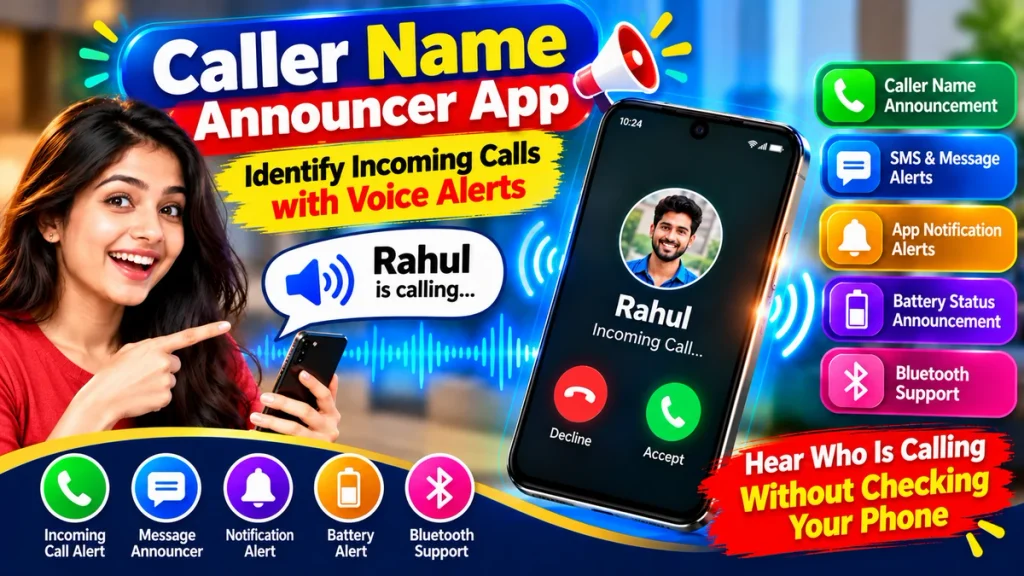
This guide explains how a Caller Name Announcer works, its important features, benefits, setup process, privacy considerations, and how voice alerts can make incoming calls easier to identify.
Caller Name Announcer App – Quick Overview
| Feature | Details |
|---|---|
| App Type | Caller Name Announcer |
| Main Function | Identify calls with voice alerts |
| Technology | Text-to-Speech (TTS) |
| Saved Contacts | Can announce caller names |
| Unknown Calls | Number announcement may be available |
| SMS Alerts | Supported by some apps |
| Custom Voice | Depends on TTS/app |
| Repeat Alerts | Available in selected apps |
| Bluetooth | Support varies |
| Offline Use | Some basic functions may work offline |
| Best For | Hands-free caller identification |
What Is a Caller Name Announcer App?
A Caller Name Announcer App is a smartphone utility designed to provide spoken information about incoming calls.
Normally, when someone calls, your phone displays the caller’s name or number. With caller-name announcements enabled, you can also hear that information through a voice alert.
For example, if a contact named Rahul calls, you might hear:
“Incoming call from Rahul.”
This means you don’t necessarily need to pick up your smartphone simply to identify the caller.
The exact behavior depends on the app, your smartphone, operating-system restrictions, permissions, and Text-to-Speech configuration.
How Do Voice Caller Alerts Work?
Most Caller Name Announcer apps use a Text-to-Speech engine.
When a call arrives, the app uses the caller information available through the phone’s operating system. If the number corresponds with one of your saved contacts, the associated contact name can be converted into spoken audio.
The basic process can be understood as:
Incoming Call → Caller Information → Contact Match → Text-to-Speech → Voice Alert
If the caller isn’t saved, some applications may announce the phone number instead.
Because smartphones handle background apps, call information, permissions, and audio differently, features may not work identically on every device.
Why Use Voice Alerts for Incoming Calls?
Voice alerts can be useful in many everyday situations.
Identify Calls Without Checking the Screen
The main advantage is that you don’t have to immediately look at the screen whenever your phone rings.
Hearing the caller’s name can help you decide whether you need to respond to the call.
Useful While Cooking
If you’re preparing food, your hands may be wet or dirty.
Instead of touching your phone simply to check who is calling, a voice announcement can provide that information automatically.
Convenient During Exercise
A phone may be in your pocket, gym bag, or placed nearby while you’re exercising.
A spoken caller name can help you identify the incoming call without interrupting your activity just to inspect the screen.
Helpful While Working
Constantly checking incoming calls can interrupt concentration.
Voice alerts can provide basic caller information so that you can determine whether a call may require immediate attention.
Accessibility Benefits
Spoken caller identification can also complement accessibility features for users who prefer audio feedback or find visual information on a smartphone screen difficult to read.
Main Features of a Caller Name Announcer App
Different apps offer different combinations of features. Here are some of the most useful options to look for.
1. Caller Name Voice Alert
This is the primary feature.
When a saved contact calls, the application can announce the contact name through spoken audio.
The announcement could be as simple as:
“Rahul is calling.”
2. Unknown Number Announcement
Not every incoming call comes from a saved contact.
Some apps can announce an unknown caller’s phone number. Others may simply provide an “Unknown Caller” voice alert.
Availability depends on the application and information available to it.
3. SMS Sender Alerts
Some Caller Name Announcer apps also support text-message announcements.
For example, when a message arrives, the app may announce the sender’s name.
Certain applications may additionally offer full message reading where supported. Users should consider privacy carefully before enabling this option.
4. Custom Voice Alerts
Some apps allow you to customize the words used in an announcement.
Instead of hearing only a contact name, you might configure the app to say:
“You have an incoming call from Rahul.”
Custom announcements can make voice alerts clearer and more personalized.
5. Repeat Announcement
A repeat option allows the caller’s name to be announced more than once while the phone is ringing.
Users should generally avoid excessive repetition because repeated voice alerts can become distracting.
6. Voice Speed and Pitch
Your phone’s TTS system may provide controls for speech rate and pitch.
If names are difficult to understand, reducing the speech speed may improve clarity.
7. Multiple Language Support
Modern Text-to-Speech engines can support several languages and voices.
If your contacts contain names written in Bengali, Hindi, Tamil, Telugu, Kannada, Malayalam, Marathi, or other languages, the quality of pronunciation will depend on the TTS language and voice installed on your phone.
8. Bluetooth and Headphone Support
Some users may prefer voice alerts through Bluetooth headphones rather than the smartphone speaker.
This can provide additional privacy in public places.
However, Bluetooth audio routing varies between smartphones, operating systems, accessories, and applications.
Caller Name Announcer Features Comparison
| Function | Purpose |
|---|---|
| Caller Name Alert | Speaks a saved caller’s name |
| Unknown Number Alert | May read an unsaved number |
| SMS Sender Alert | Announces message sender |
| SMS Reading | May read message content |
| Custom Phrase | Personalizes voice alerts |
| Repeat Control | Controls alert frequency |
| Voice Speed | Adjusts speech rate |
| Language Selection | Changes supported TTS language |
| Bluetooth Support | May play alerts on connected device |
| Silent Mode Control | Helps manage unwanted alerts |
How to Set Up Caller Name Voice Alerts
The setup process varies depending on the application, but the general steps are straightforward.
First, search your phone’s official app store for a suitable Caller Name Announcer application.
Before installing an app, review its developer information, privacy details, recent updates, user feedback, and requested permissions.
After installation, open the application and find the option for Caller Name Announcement or Incoming Call Voice Alert.
Enable the feature and grant only the permissions required for the functions you intend to use.
Next, check your phone’s Text-to-Speech settings.
Choose an appropriate language and voice. You may also adjust the speech speed and pitch.
If available, customize the announcement text and select how many times the caller’s name should be repeated.
Finally, safely test the feature using another phone.
Caller Name Announcer with Bluetooth
Bluetooth support can make caller-name announcements more convenient.
If you’re using compatible wireless headphones, you may prefer the caller’s name to be announced privately through them instead of through the smartphone loudspeaker.
However, this isn’t guaranteed with every configuration.
Audio routing depends on your smartphone, operating-system version, Bluetooth device, Text-to-Speech engine, and the application itself.
Testing the feature on your own device is therefore important.
Does Caller Name Announcer Work Without Internet?
Some basic caller-name voice alerts may work without internet access.
If your contacts are stored on the device and the required Text-to-Speech voice is available locally, the phone may be able to generate the announcement without a data connection.
However, not every app feature is necessarily offline.
Cloud-based voices, advertisements, online services, app updates, or certain advanced functions may require an internet connection.
If offline caller announcements are important to you, check the specific app’s capabilities.
Voice Alerts While Driving
A spoken caller alert may help you identify who is calling without looking at the phone screen solely for caller identification.
However, a voice alert should not encourage unsafe smartphone use while driving.
Do not manually interact with your phone when doing so is unsafe or prohibited. Follow applicable traffic laws and use an appropriate hands-free system where permitted.
The purpose of a voice alert is to provide information with less screen interaction—not to eliminate the risks associated with distracted driving.
Privacy and Security
Caller Name Announcer apps may require access to sensitive information to provide certain features.
Depending on the application, requested permissions might relate to contacts, calls, notifications, SMS, or other phone functions.
Some permissions can be necessary for a specific feature, but users should still understand why they are requested.
Avoid granting permissions that appear unrelated to the app’s stated purpose.
There is also an important audio privacy issue.
If your phone announces a caller’s name aloud, anyone nearby could hear it.
Full SMS announcements can reveal even more sensitive information. A private message, banking notification, verification message, or personal conversation could potentially be spoken aloud.
For better privacy, consider limiting announcements to caller names and SMS sender names instead of complete message content.
Advantages and Limitations
| Advantages | Limitations |
|---|---|
| Identify calls without checking screen | Features vary by device |
| Convenient voice alerts | Can disturb people nearby |
| Useful when hands are occupied | Permissions may be required |
| Can complement accessibility tools | Some names may be mispronounced |
| Multiple languages may be available | TTS language support varies |
| SMS alerts may be supported | Message reading creates privacy concerns |
| Bluetooth support may be available | Audio routing varies |
| Basic features may work offline | Some services require internet |
Tips for Better Voice Alerts
For clearer announcements, keep contact names simple and properly written. Symbols, abbreviations, or unusual spellings can sometimes make Text-to-Speech pronunciation less accurate.
Choose the correct TTS language for your contact list.
Adjust the speech speed if announcements are difficult to understand.
Use only one or two repetitions instead of repeatedly announcing the same caller.
When you’re in a meeting, classroom, hospital, library, or another quiet environment, disable voice alerts or use suitable silent and Do Not Disturb settings.
You should also enable only the functions you genuinely need. If caller-name alerts are sufficient, there may be no reason to allow full SMS message reading.
Frequently Asked Questions (FAQ)
1. What is a Caller Name Announcer App?
A Caller Name Announcer App uses spoken audio to provide available information about an incoming caller, such as a saved contact name.
2. How does it identify incoming calls?
The app can match available incoming caller information with your saved contacts and use Text-to-Speech technology to speak the corresponding name.
3. Can it announce unknown phone numbers?
Some applications can announce unsaved phone numbers, depending on device support and permissions.
4. Can Caller Name Announcer work without internet?
Some basic announcements may work offline when contact information and TTS voice data are stored locally.
5. Can I change the voice alert?
Many apps or TTS engines provide options for language, voice, speech speed, pitch, or custom announcement phrases.
6. Can it announce SMS messages?
Some applications can announce SMS sender names and may offer message-content reading where supported.
7. Can I turn off SMS reading?
Where separate controls are provided, you can generally disable message reading while keeping incoming caller announcements enabled.
8. Does it work with Bluetooth headphones?
It may. Compatibility depends on the phone, operating system, application, and Bluetooth accessory.
9. Why does the app pronounce some names incorrectly?
TTS engines can struggle with unusual names, regional spellings, abbreviations, or names written in a different language from the selected voice.
10. Can I stop voice alerts during meetings?
Depending on the app, you may be able to disable announcements temporarily or use compatible silent and Do Not Disturb settings.
Conclusion
A Caller Name Announcer App can make it easier to identify incoming calls with voice alerts without repeatedly checking your smartphone screen.
Using Text-to-Speech technology, compatible applications can speak saved contact names and may also provide unknown-number announcements, SMS sender alerts, customizable voice settings, repeat controls, language options, and Bluetooth support.
These features can be useful while working, exercising, cooking, or performing other activities where looking at your phone isn’t convenient.
For a better and safer experience, choose a trusted application, carefully review its permissions, configure an appropriate TTS voice, and enable only the features you need. Privacy is especially important when announcements are played through the phone’s loudspeaker or when SMS-reading functions are enabled.
With sensible settings, a Caller Name Announcer App can provide a practical hands-free way to stay informed about incoming calls through clear voice alerts.