Hair Color Try-On App – See How Different Hair Colors Look on You Before Dyeing
Changing your hair color can completely transform your appearance, but choosing the right shade is not always easy. Whether you want to try chocolate brown, burgundy, blonde, copper, or a bold fashion color, selecting a shade without knowing how it will look can be confusing. This is where a Hair Color Try-On App can make the decision easier.
Modern AI-powered hair color applications allow users to preview different hair shades using their own photographs. Instead of visiting a salon and immediately committing to permanent hair dye, you can experiment with various colors virtually on your smartphone.
Many virtual hair color apps provide realistic hair color filters, AI hair detection, natural shade previews, and personalized makeover options. These features help users explore different looks, compare hair colors, and find inspiration before booking a salon appointment.
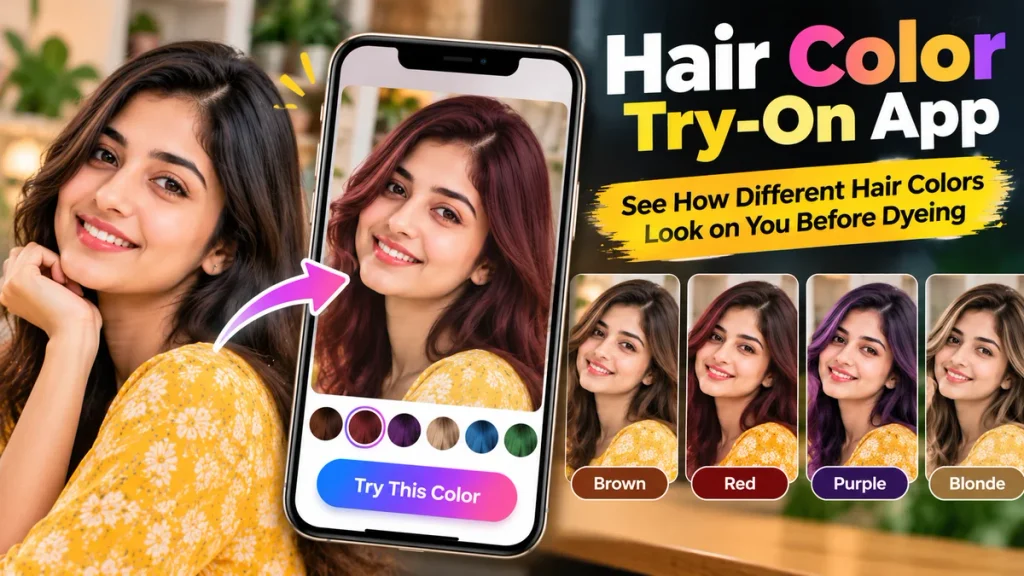
In this guide, we will explain how hair color try-on apps work, their important features, benefits, popular applications, and step-by-step instructions for testing different hair colors on Android and iPhone.
What Is a Hair Color Try-On App?
A Hair Color Try-On App is a mobile application or online tool that allows users to preview different hair colors digitally without physically dyeing their hair.
These applications use image processing, artificial intelligence, and augmented reality technology to identify the hair area in a photograph or live camera view.
Once the hair is detected, users can apply different virtual colors to see how each shade might look.
For example, if you have black hair and want to explore burgundy highlights, an AI hair color changer can create a digital preview.
Similarly, users can experiment with blonde, caramel, copper, ash brown, red, or other available shades.
Some applications offer live camera previews, while others generate edited images from uploaded photographs.
Although these previews provide useful inspiration, actual hair dye results depend on natural hair color, hair condition, lighting, dye formulation, and application techniques.
Hair Color Try-On App – Features and Benefits
The following table highlights the main features available in virtual hair color applications.
| Feature | Description | Benefits |
|---|---|---|
| Virtual Hair Color Try-On | Previews different hair shades | Explore colors before dyeing |
| AI Hair Detection | Identifies visible hair areas | More accurate editing |
| Live Hair Color Filter | Displays selected shades through a camera | Real-time previews |
| Natural Hair Color Options | Offers brown, black, blonde, and similar shades | Everyday hairstyle inspiration |
| Fashion Hair Colors | Includes pink, blue, purple, and red | Creative experimentation |
| Hair Highlights Preview | Simulates selected highlight effects | Explore different styles |
| Before-and-After Comparison | Compares original and edited photographs | Easier shade selection |
| AI Hair Makeover | Generates alternative hair appearances | New styling ideas |
| Photo Saving | Saves virtual hair color images | Share with hairstylists |
| Multiple Shade Options | Allows comparisons between colors | More informed decisions |
Features vary depending on the application, device compatibility, and subscription plan.
How Does a Hair Color Try-On App Work?
A hair color try-on application generally uses computer vision technology to identify the hair region in a photograph or video.
When a user uploads a selfie, the app analyzes the image to distinguish hair from the face, skin, clothing, and background.
The selected hair color is then applied digitally to the detected area.
Some applications attempt to preserve the original hair texture, shadows, and highlights to create a more natural appearance.
Advanced tools may also adjust the simulated color according to lighting conditions and existing hair tones.
For example, choosing a copper shade may produce a different preview on black hair than on blonde hair.
However, these previews are not exact predictions of chemical hair dye results.
They are designed to help users visualize possible looks before making a physical change.
Top Benefits of Using a Hair Color Try-On App
1. Preview Hair Colors Before Dyeing
One of the biggest advantages of using a Hair Color Try-On App is the ability to see different shades before applying real hair dye.
This helps users compare several looks without committing immediately.
2. Experiment Without Changing Your Hair
Virtual hair color applications allow users to explore bold or unusual shades without permanently altering their natural hair.
You can test blonde, red, blue, or purple hair in minutes.
3. Discover New Hair Color Ideas
Sometimes people choose familiar shades because they are uncertain about trying something different.
AI hair color tools can introduce new color combinations and styling possibilities.
4. Compare Multiple Hair Shades
Instead of imagining how different colors might appear, users can compare edited photographs side by side.
This makes it easier to shortlist preferred shades.
5. Communicate With Your Hairstylist
Virtual hair color previews can serve as reference images during salon consultations.
A hairstylist can explain whether the selected shade is achievable and what preparation may be required.
6. Save Time During Hair Makeovers
Testing different colors virtually can simplify the initial decision-making process.
Users can explore options at home before visiting a salon.
Popular Hair Color Try-On Apps and Tools
Several beauty applications and online services provide virtual hair color features.
1. YouCam Makeup
YouCam Makeup provides virtual beauty tools, including hair color simulation features.
Depending on the available version, users can explore different hair shades and compare makeover options.
2. L’Oréal Paris Virtual Try-On
L’Oréal Paris offers virtual hair color experiences in supported markets and product ranges.
These tools can help users preview selected hair color shades before purchasing related products.
3. Garnier Virtual Hair Color Tools
Garnier provides hair color information and virtual try-on experiences in some markets.
Users can explore available color options and compare potential looks.
4. Facetune
Facetune provides selfie editing and appearance adjustment tools, including hair-related editing features in supported versions.
Some features may require a subscription.
5. AI Photo Editing Tools
Certain AI photo editors also allow users to change hair color through image editing or text-based prompts.
For the most realistic result, choose tools that preserve facial features and natural hair texture.
Feature availability and pricing should always be checked before downloading an application.
How to Try Different Hair Colors on Android
Android smartphone users can explore virtual hair colors through compatible applications.
Step 1: Open Google Play Store
Launch the Google Play Store on your Android device.
Step 2: Search for Hair Color Try-On
Search for terms such as “Hair Color Try-On App” or “AI Hair Color Changer.”
Step 3: Select a Reliable App
Review its features, developer details, permissions, and recent user feedback.
Step 4: Install the Application
Download and open the selected application.
Step 5: Upload a Clear Photograph
Choose a selfie with good lighting and clearly visible hair.
Step 6: Select a Hair Color
Explore available shades such as brown, blonde, burgundy, or copper.
Step 7: Apply the Virtual Color
Allow the application to generate a preview.
Step 8: Compare Different Looks
Try several shades to find your preferred appearance.
Step 9: Save Your Photo
Export the virtual makeover image if the app supports saving.
How to Use a Hair Color Try-On App on iPhone
iPhone users can explore hair colors through compatible apps or browser-based virtual try-on tools.
The process is generally simple:
- Open the Apple App Store.
- Search for a virtual hair color application.
- Review the application’s available features.
- Install and launch the selected tool.
- Upload a selfie or enable the live camera preview.
- Select your preferred hair shade.
- Adjust the color intensity if supported.
- Compare different options.
- Save or share your favorite preview.
The exact options depend on the application and iOS version.
How to Choose a Hair Color That Suits You
Hair color selection depends on personal preference, natural hair color, skin undertone, lifestyle, and maintenance expectations.
The following table provides styling ideas rather than strict rules.
| Skin Undertone | Hair Colors to Explore | Possible Appearance |
|---|---|---|
| Warm | Golden brown, caramel, copper | Warm and vibrant |
| Cool | Ash brown, cool blonde, burgundy | Cooler-toned contrast |
| Neutral | Chocolate brown, beige blonde, soft black | Balanced appearance |
| Olive | Espresso, chestnut, auburn | Rich color contrast |
| Deep | Burgundy, copper, deep brown | Bold or subtle depending on shade |
Any hair color can be a valid personal choice regardless of skin tone. Virtual try-on tools are useful for experimenting beyond conventional styling suggestions.
Best Hair Color Trends to Explore With AI
Virtual hair color applications allow users to experiment with many classic and creative looks.
Chocolate Brown
Chocolate brown is a versatile shade that can create a rich, natural-looking appearance.
Burgundy Hair
Burgundy combines red and violet tones, offering a bold but wearable color option.
Caramel Highlights
Caramel highlights can add visible contrast and dimension to darker hair.
Copper Hair
Copper shades provide warm reddish-orange tones and can create a distinctive look.
Ash Blonde
Ash blonde offers a cooler appearance and is often explored by users interested in lighter hair colors.
Fashion Colors
Pink, purple, blue, and other creative shades allow users to experiment with unconventional looks.
Achieving these shades in real hair may require bleaching or other professional coloring processes.
Tips for Getting Realistic Virtual Hair Color Results
The quality of the original photograph affects the appearance of virtual hair color previews.
Use Natural Lighting: Choose a clear photograph with balanced lighting.
Keep Hair Visible: Avoid covering large sections of your hair with hats or accessories.
Avoid Heavy Filters: Existing filters may distort the selected color.
Use a High-Quality Selfie: Clear photographs help the app identify hair boundaries.
Try Several Shades: Compare natural and bold color options.
Check Multiple Photographs: Hair color may appear different under various lighting conditions.
Consult a Hairstylist: Ask whether your preferred shade is achievable with your current hair color and condition.
Virtual Hair Color vs Real Hair Dye
Virtual previews and actual hair coloring serve different purposes.
| Virtual Hair Color | Real Hair Dye |
|---|---|
| Creates a digital color preview | Physically changes hair color |
| Does not chemically alter hair | Uses coloring products |
| Allows instant experimentation | Requires application time |
| Easy to compare different shades | Recoloring may require additional treatment |
| Results are simulated | Results depend on hair condition and dye |
| Useful for planning | Produces the actual makeover |
Virtual try-on is best viewed as a planning tool rather than a substitute for professional hair color advice.
Are Free Hair Color Try-On Apps Worth Using?
Many virtual hair color applications offer free previews or limited editing features.
Users may be able to try basic shades without paying.
However, advanced AI transformations, exclusive color collections, high-resolution exports, or additional editing controls may require premium plans.
Some free applications also include advertisements or usage restrictions.
For occasional experimentation, a free virtual hair color tool may be sufficient.
Before purchasing a subscription, review its pricing and renewal conditions.
Is a Hair Color Try-On App Safe to Use?
Hair color try-on applications often require access to facial photographs or camera input.
Some AI-powered tools process uploaded images through remote servers.
Before installing an application, review its privacy policy and requested permissions.
Use trusted download sources and avoid uploading sensitive photographs to unfamiliar services.
If you decide to dye your hair after trying a virtual shade, remember that hair dyes can sometimes cause allergic reactions.
Follow product instructions, including allergy alert testing where directed, or consult a qualified hair professional.
Frequently Asked Questions (FAQ)
1. What is a Hair Color Try-On App?
A Hair Color Try-On App is a digital tool that allows users to preview different hair colors on their photographs using AI or augmented reality technology.
2. Can I see how blonde hair looks on me?
Yes. Many virtual hair color applications provide blonde shade previews using uploaded photographs or live camera effects.
3. Are Hair Color Try-On Apps free?
Some apps offer free previews, while advanced shades, editing features, or high-resolution exports may require payment.
4. Which app can change my hair color in a photo?
YouCam Makeup, Facetune, and certain AI photo editing tools provide hair-related appearance editing features.
5. Can I try hair colors without actually dyeing my hair?
Yes. Virtual hair color tools create digital previews without physically changing your hair.
6. Can AI suggest hair colors for my skin tone?
Some AI applications provide personalized suggestions based on visible facial features or estimated skin undertones. These suggestions are not definitive.
7. Do Hair Color Try-On Apps work on Android?
Yes. Compatible Android applications and online tools provide virtual hair color features.
8. Can iPhone users try virtual hair colors?
Yes. Several compatible iPhone applications and browser-based services offer virtual hair color previews.
9. Are virtual hair color previews accurate?
They can provide useful visual guidance, but real coloring results depend on natural hair color, hair condition, lighting, and dye formulation.
10. Can I show my AI hair color preview to a hairstylist?
Yes. A saved virtual hair color image can help communicate your preferred shade during a salon consultation.
Conclusion
A Hair Color Try-On App is a convenient way to explore different hair colors before making a real change. With AI-powered color simulation, virtual makeover features, and before-and-after comparisons, users can experiment with a wide variety of shades directly from their smartphones.
Whether you are considering chocolate brown, burgundy, caramel highlights, blonde, or a bold fashion color, virtual hair color technology can provide inspiration and help you compare different looks.
For the best results, choose a reliable application, upload a clear photograph, experiment with several shades, and review the previews under different lighting conditions. Before applying permanent hair dye, consult a hairstylist about realistic results, maintenance, and hair safety.
With the right combination of AI technology and professional advice, you can explore exciting hair color possibilities and choose a new look with greater confidence.