Best Hair Colour App – Try Different Hair Colours on Your Photo Before Dyeing Your Hair
Changing your hair colour can completely transform your appearance, but choosing the right shade is not always easy. A colour that looks attractive on someone else may appear different depending on your natural hair colour, skin tone, and lighting. A Best Hair Colour App helps users preview different hair shades using their own photographs before visiting a salon or applying hair dye.
Artificial intelligence has made virtual hair colouring more convenient through smartphones. Instead of guessing how chocolate brown, burgundy, blonde, copper, or caramel highlights might look, users can upload a selfie and experiment with digital transformations. Some applications also support ombre effects, highlights, and multiple hair colours.
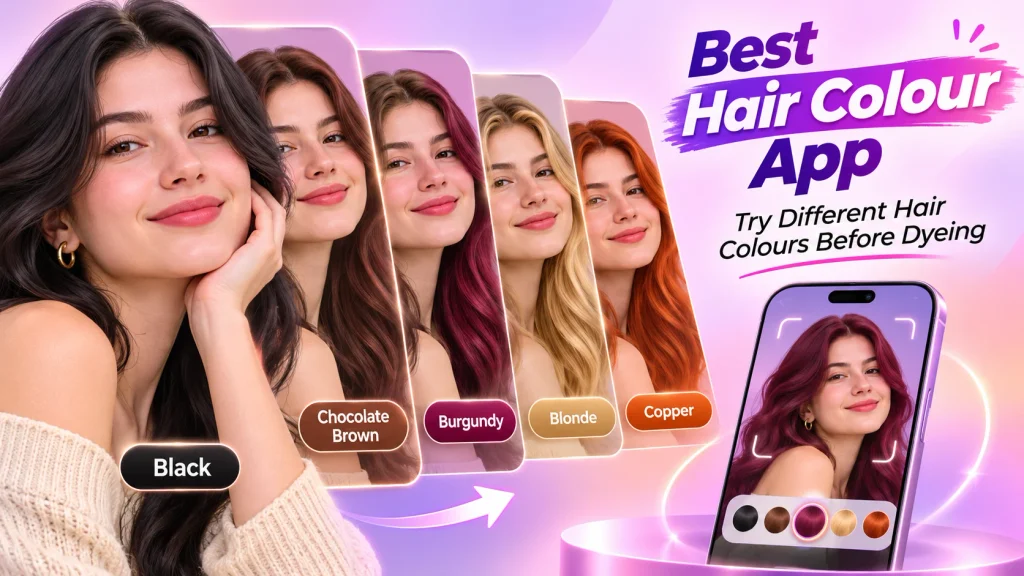
Whether you want a natural shade, fashionable colour, or dramatic makeover, an AI Hair Colour Changer App can provide useful inspiration. This guide explores popular virtual hair colour tools, their features, benefits, and practical methods for testing new shades before colouring your hair.
What Is a Hair Colour Try-On App?
A hair colour try-on app is a digital photo editing application that allows users to preview different hair colours virtually.
Modern applications use artificial intelligence and image-processing technology to identify hair regions and apply digital colour effects.
Common features include:
- Virtual hair colour previews.
- Natural and fashionable shades.
- Blonde, brown, burgundy, and red colours.
- Highlights and ombre effects.
- Before-and-after comparisons.
- Custom colour adjustments.
- Photograph-based transformations.
- Downloadable makeover images.
Available features depend on the application, supported device, and subscription plan.
How Does an AI Hair Colour Changer Work?
AI hair colour applications use computer vision to identify visible hair boundaries within photographs.
After users select a shade, the application digitally modifies the hair colour while attempting to preserve natural texture and lighting.
For example, someone with black hair can preview chocolate brown or burgundy without applying chemical dye.
Users can also experiment with blonde highlights, copper shades, and other fashionable colours.
However, virtual previews are estimates. Actual colouring results depend on natural pigmentation, previous treatments, bleaching requirements, and professional techniques.
Best Hair Colour Apps and Online Tools
Several applications provide virtual hair colour experimentation.
1. YouCam Makeup – Virtual Hair Colour Try-On
YouCam Makeup is an AI-powered beauty application offering virtual hair colour transformations.
Users can upload photographs or use supported live-camera features to experiment with different shades.
Important Features:
- AI hair colour transformations.
- Natural and fashionable shades.
- Ombre and multi-colour effects.
- Custom colour adjustments.
- Live-camera colour previews.
- Before-and-after comparisons.
YouCam Makeup is useful for exploring different colours before visiting a hairstylist.
The application offers free features, while certain advanced options require premium access.
2. Fotor – Online AI Hair Colour Changer
Fotor provides an online AI Hair Colour Changer that allows users to upload photographs and preview different shades.
The browser-based tool supports digital hair colour transformations.
Important Features:
- AI-powered colour previews.
- Blonde, brown, black, and red shades.
- Custom hair colour options.
- Photograph-based editing.
- Before-and-after comparisons.
- Downloadable results.
Fotor is useful for people who prefer browser-based experimentation.
Available free features and generation limits may vary.
3. YouCam Online Editor – AI Hair Colour Preview
YouCam Online Editor provides virtual hair colour editing through a browser.
Users can upload selfies and explore different colours without installing a dedicated application.
Important Features:
- AI hair colour detection.
- Natural and creative shades.
- Two-tone colour options.
- Virtual makeover previews.
- Photo uploads.
- Downloadable edited images.
Certain editing features or additional generations may require paid access.
Best Hair Colour Apps Comparison Table
| App or Tool | Main Features | Best For |
|---|---|---|
| YouCam Makeup | Hair colours, ombre, live previews | Mobile makeovers |
| Fotor | AI colour changes, custom shades | Online photo editing |
| YouCam Online | Hair colour previews, dual tones | Browser-based experimentation |
Note: Features, subscription prices, credits, and device compatibility may change.
Popular Hair Colours to Try Virtually
Different colours create different appearances.
| Hair Colour | Appearance |
|---|---|
| Natural Black | Deep, classic shade |
| Chocolate Brown | Rich, warm brown |
| Burgundy | Dark reddish-purple |
| Golden Blonde | Warm golden shade |
| Copper | Reddish-orange tone |
| Caramel Highlights | Golden-brown accents |
| Ash Brown | Cool-toned brown |
| Cherry Red | Bright reddish shade |
Users can experiment with shades according to personal preferences.
How to Try Hair Colours on Your Photo
Follow these steps to preview different colours using your smartphone.
Step 1: Choose a Trusted Application
Select an AI hair colour tool supporting photograph uploads.
Step 2: Open the Application
Install the app or access its supported website.
Step 3: Upload Your Photograph
Choose a clear selfie with natural lighting.
Step 4: Select the Hair Colour Feature
Open the available virtual colouring section.
Step 5: Choose Your Shade
Experiment with brown, blonde, burgundy, copper, or other supported colours.
Step 6: Compare Different Looks
Review multiple previews before selecting your favourite.
Step 7: Save Your Preferred Colour
Save the image and discuss it with a professional colourist.
How to Choose a Suitable Hair Colour
Skin undertone, existing hair pigmentation, and personal style can influence colour choices.
People with warm undertones may enjoy experimenting with caramel, golden brown, and copper.
Cool undertones may complement ash brown, cool burgundy, or certain blonde shades.
Neutral undertones can explore a wide selection of colours.
However, these are styling suggestions rather than strict rules.
Your natural hair colour and previous chemical treatments also affect the achievable result.
Benefits of Using a Hair Colour Changer App
Preview Colours Before Dyeing
Users can explore different shades without immediately applying chemical products.
Experiment With Fashionable Looks
Virtual tools support natural colours and creative combinations.
Compare Multiple Shades
Digital previews make comparing hair colours more convenient.
Explore Highlights
Supported applications provide virtual highlights, ombre effects, and multi-colour options.
Prepare for Salon Visits
Saved previews help users explain preferred colours to hairstylists.
Tips for Better Hair Colour Previews
Use a clear photograph in natural daylight.
Avoid heavy beauty filters.
Keep your hair visible without excessive shadows.
Compare multiple shades before making decisions.
Remember that digital colours may appear different on various screens.
Discuss bleaching requirements and hair condition with a professional before colouring.
Always follow hair dye safety instructions, including recommended allergy testing.
Frequently Asked Questions (FAQs)
1. Which is the best hair colour app?
YouCam Makeup, Fotor, and YouCam Online provide useful virtual hair colour features. The best choice depends on individual preferences.
2. Can I try hair colours using my own photo?
Yes. Supported applications allow users to upload selfies and generate virtual colour previews.
3. Are hair colour changer apps free?
Some applications offer free features, while additional editing options may require subscriptions or credits.
4. Can I try blonde hair before bleaching?
Yes. Virtual tools allow users to preview blonde shades, although actual results may require professional bleaching.
5. Can men use hair colour apps?
Yes. Many virtual colouring tools support different hair lengths and styles regardless of gender.
6. Are virtual hair colour previews accurate?
Not always. Actual results depend on existing pigmentation, lighting, hair condition, and colouring techniques.
Conclusion
A Best Hair Colour App makes exploring different hair shades convenient through smartphones and online platforms. Users can upload photographs, compare natural and fashionable colours, and experiment with highlights before applying actual dye.
YouCam Makeup, Fotor, and YouCam Online offer different virtual colouring features. Choose a trusted platform, explore several shades, and use generated previews as inspiration when consulting a professional hairstylist.
Disclaimer
This article is provided for general educational and informational purposes only. Hair colour application features, subscription prices, free usage limits, and device compatibility may change without notice. All mentioned platforms operate independently, and no commercial affiliation or endorsement is implied. AI-generated hair colour previews are illustrative and do not guarantee identical real-world results. Actual colouring outcomes depend on natural pigmentation, previous treatments, bleaching, and professional techniques. Hair dyes may cause allergic reactions or damage. Follow product instructions and recommended allergy testing procedures, and consult a qualified professional before significant colour changes. Users should also review application privacy policies before uploading personal photographs.